
GENERAL INFORMATION
How do I Manage My Account?
Log in here if you would like to update your account email, mailing address, credit card, bill, renewal, or other areas related to your current subscription/membership.
How do I contact Customer Service?
Email: Click here to email.
Phone: Call +1 (423) 888-9809 from 9AM-5PM US Eastern, Monday-Friday. Phone is unavailable evenings, weekends, or US Holidays.
Mail: BOATING, PO Box 217 Lincolnshire IL 60069-9842.
DIGITAL ISSUE ACCESS: Subscribers can visit the Zinio Web Library and enter active email to access issues instantly in the browser. Download the iOS app for seamless, on-the-go access to every issue. To connect or adjust your subscription, please click here to email, or call +1 (423) 888-9809.
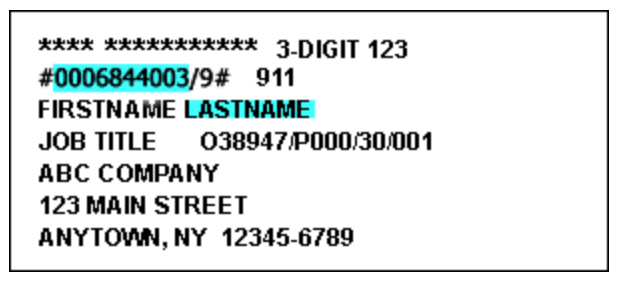
What is my Account Number? Print subscribers can find the account number on the magazine address label, as highlighted in the sample below. The 10-digit number that appears above the name: 0006844003. If you’re not a print subscriber or do not have your account number, you can still log in here using your last name and email.
PAYMENT & BILLING INFORMATION
How do I change my address? Log in to your account and click “Change Address”. For assistance, click here to email or call +1 (423) 888-9809.
What do I do to report a missing or damaged issue? If an issue appears to be missing or damaged, click here to email or call +1 (423) 888-9809.
How do I pay my bill? Log in and select “Pay Bill”. For assistance, click here to email or call +1 (423) 888-9809.
How do I update my credit card information? Log in and select “Update Credit Card” and follow the steps. You may also contact customer service as detailed above.
How do I renew my subscription that is not on automatic renewal? Log in and select “Renew” and choose an option. For assistance, click here to email or call +1 (423) 888-9809. Mailed and email renewal notices may be sent prior to the end of your subscription period.
How do I turn ON automatic renewal? Log in and select “Add AutoRenew” and follow the steps. By enrolling, the subscription will automatically renew at the end of each term for the same duration as the original term until you cancel. Pricing is subject to change. For each renewal, you authorize us to charge the credit or debit card on file. A reminder notice with the applicable renewal rate will be sent at least 30 days before your card is charged. Cancel any time via the details above. By enrolling, you accept Firecrown’s Terms of Use and Privacy Policy.
How do I turn OFF automatic renewal of my subscription? Log in and select “Cancel AutoRenew” and follow the steps. The subscription will then expire at the current term’s end, and will not auto renew. You may also contact customer service as detailed above.
How do I cancel or request a refund of my subscription? To cancel or inquire about a refund, please click here to email, or call +1 (423) 888-9809, or mail to BOATING, PO Box 217 Lincolnshire IL 60069-9842. Any eligible refunds will be issued for remaining liability of unserved issues.
Why have I been charged on my credit card? A charge on your credit card statement that reads “BOATINGMAG* FLY-BGM” or “FLY-BGM” is for a Firecrown Media BOATING product. By placing an order online with us, you authorized Firecrown to charge the credit or debit card provided to purchase or renew at the current rate. Pricing is subject to change. For annual subscriptions or memberships, you will receive a reminder notice with the applicable renewal rate at least 30 days before your card is charged. Update or cancel the card on file at any time by logging in to your account. Cancel and request eligible refund anytime via the details above under cancel. By enrolling, you accept our Terms of Use and Privacy Policy.
Are my credit card transactions secure? Refer to our Privacy Policy.
GIFTS
How do I order a gift subscription? Visit firecrown.com/all-magazines to see gift subscriptions across all our brands or visit this link for Boating gifts.
EMAIL & CONTACT PREFERENCES
How can I be removed from your mailing lists? Click here to email and put “Unsubscribe” in the message along with the email(s) and mailing address(es) to remove, or call +1 (423) 888-9809.
How do I manage my email preferences? You can click here to email, or call +1 (423) 888-9809.
Do you sell my email address? Refer to our Privacy Policy.
What do you do with the information you collect? Please refer to our Privacy Policy and Terms of Use.